How to Run a Pool of Autonomous Coding Agents on Your Jira Backlog
What if you could point a fleet of AI agents at your Jira backlog and let them work through it continuously claiming issues, writing code, opening pull requests, and updating ticket status while you focus on the work that actually needs a human?
AI Coding Factories also known as software factories are a new pattern for software development where autonomous coding agents work on a Jira backlog, implement features, run tests, deploy software and update the tickets without human intervention. This approach to software development is becoming more and more popular among startups that need to move fast. With the recent advancements in coding agents, it is now possible to build a system that can do this in a reliable and efficient way.
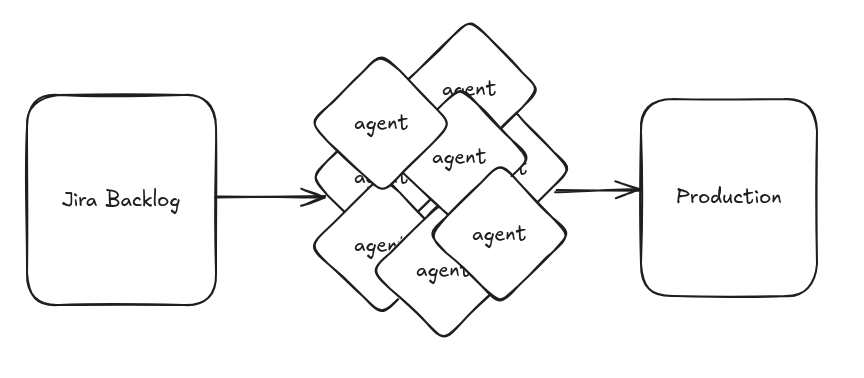
So how difficult is to set up your own AI coding factory? In this post, I will share my experience building an AI coding factory that could be reused by individuals, startups and in some cases even enterprise organisations.
The Problem
AI coding assistants have become part of the daily workflow for many developers. The pattern is familiar: open a chat, describe a task, review the output, iterate. It works well, but it is inherently synchronous and one-at-a-time.
Since my original post about coding factories, modern agents have become increasinly apt at implementing even loosely specified features. This improvement in effectiveness has opened new possibilities for larger scale automation.
Existing automation approaches tend to get in the way. They often require standing up a custom orchestration server, maintaining a separate task store that needs to stay in sync with Jira, or committing to a single AI provider’s platform. The result is infrastructure that is harder to operate than the problem it solves.
I set myself a much simpler goal: a lightweight solution that works with the tools teams already have: Jira, Git, Docker, and the coding agent of their choice. A solution that will adapt to whatever workflow the team uses, without any lock-in.
For the time being, I gave this project an unimmaginative name: ai-coding-factory. I’m open to suggestions for a better one.
Core Design Decisions
Several early decisions shaped everything that followed.
A tool suite, not a platform
AI Coding Factory is four small CLI tools and a handful of Dockerfiles. There is no server to run, no database to provision, no web UI to maintain. Each tool does one thing and can be used independently. The entire system can be audited in an afternoon.
Jira as the single source of truth
Rather than maintaining a separate task store that shadows Jira, the system uses Jira directly as its queue. Issue status in Jira reflects reality at all times. There is no import step, no sync loop, no risk of the two getting out of alignment. Workers read from Jira, write to Jira, and that is the complete picture. I’m planning to add support for other issue trackers in the near future.
Pull model, not push
Initially I thought about having a central scheduler that spawns agents for each issue. This turned out to be more complex and less robust than a simple pull model where workers poll Jira for available issues. This means scaling is trivial: start more containers to increase throughput, stop some to slow down, raise the polling interval to slow down further. There is no scheduler to configure and no message queue to operate: Jira IS the queue.
Agent-agnostic
Workers are thin Docker images that install a specific agent CLI on top of the worker loop. Swapping providers is a one-line change. Pre-built images exist for Claude and GitHub Copilot and the worker-builder tool generates project-specific images that layer any agent on top of a project’s own devcontainer, so the agent works in the same environment as the project’s developers, with the same tools and dependencies already installed.
A CLI, not a GUI
Every operation (claiming issues, managing workers, reading logs) is a shell command. This is not a constraint imposed by minimalism; it is a deliberate choice. CLIs are more testable than GUIs, easier to script, and more accessible to the agents themselves. When an agent needs to interact with the system, it uses the same tools a human would.
Flexible Workflow
Different teams have different needs, and the system tries not to impose a specific process. Two optional features can be combined freely.
Optional Planning Phase
By default, workers claim an issue and go straight to implementation. For teams that want a review gate before any code is written, the planning phase adds an intermediate step.
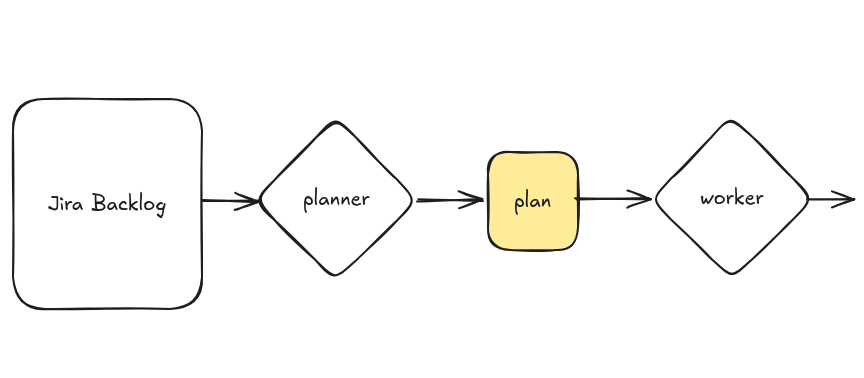
When enabled, a dedicated planner worker picks up the issue first. It generates a markdown implementation plan, posts a Jira comment with a direct link to the file on GitHub, and transitions the issue to Awaiting Plan Review. Then it immediately moves on to the next issue.
A human reviewer reads the plan on GitHub (and can edit it directly before approving). When satisfied, they transition the Jira issue to Plan Approved. The implementer worker then picks it up, finds the plan file, and uses it when implementing.
Neither role blocks waiting for the other. The approval window is dead time for the issue, not for any running worker.
Individual issues can opt out with a skip-plan label even when planning is enabled by default. If the required Jira statuses do not exist in the project’s workflow, the worker logs a warning and proceeds to implementation, so that it never fails or leaves a ticket in a broken state because of a missing status.
Trunk-Based Development or Feature Branches
By default, workers push directly to the main branch, which is good for fast-moving projects where speed matters more than review overhead.
When feature branches are enabled, workers instead create a feature/<ISSUE-KEY> branch, implement the work there, open a pull request against main, post the PR link to the Jira issue, and transition the ticket to In Review. A human reviews and merges the PR through the normal code review process. The worker never merges.
The two features compose cleanly. The resulting workflow depends on which combination of options are enabled:
Simple workflow for fast-moving projects:

Full workflow with planning and feature branches:

Or anything in between, depending on which features you enable and which statuses your Jira workflow supports.
Lessons Learned
Jira as the queue worked better than expected. The concern going in was that Jira’s API would be too slow or too rate-limited for tight polling loops. In practice it was fine. More importantly, using Jira as the queue meant getting its UI for free. Stakeholders could manage the backlog, track progress, and see agent comments in the tool they already use, with no additional integration work.
Stateless workers simplify everything. Because workers carry no local state beyond what is in Jira and the Git repository, crash recovery is automatic. A failed worker leaves its issue in In Progress with itself as assignee. The claim logic treats stale assignments as available (after a timeout), so a restarted worker (or any other worker) simply picks it up and continues. No recovery procedure, no manual intervention.
Separating planner and implementer roles was the right call. The planning phase initially seemed like it would require workers to pause and wait for human approval, which would have tied up containers. Splitting into two role types (each of which only does its part and immediately moves on) means approval latency never affects throughput. Workers are always working.
It burns through your backlog in a good way. The system is designed to keep workers busy as long as there are issues to work on. If the backlog is well-groomed and contains a healthy number of issues that are ready to be worked on, you’ll see steady progress. In my setup it completed three user stories per hour. Which translates to 1008 user stories per sprint! Ok, that’s hypothetical, because then the problem becomes feeding the factory, not running it.
Try It
The system is small, auditable, and works with tools most development teams already have. If you have a Jira project with a reasonably well-specified backlog and a Git repository, you can have workers running against it with a few environment variables and a factory add command.
The code is at: